Docs menu
Plans
Primcloud has three plans. Standard is $0, Pro is $29/mo, and Team is $49/mo, each plus compute billed by the minute. Every account starts on Standard and can upgrade to Pro or create a Team from Account → Billing.
On this page
A Primcloud bill has two parts: your plan, a flat monthly fee, and metered compute for whatever your apps actually run. There are three plans:
| Plan | Price | Built for |
|---|---|---|
| Standard | $0 | Getting an app live. Every account starts here. |
| Pro | $29/mo | Heavier personal use: more build minutes, more environments, longer logs. |
| Team | $49/mo | A group sharing apps, with member roles, audit logs, and its own billing. |
Every plan adds compute usage on top, and Team adds $5 a month for each seat past the five it includes. There's no free tier of compute: the smallest pod is around $5 a month, metered by the minute. A Standard account costs $0 to have, because an account with nothing deployed isn't using anything.
What each plan includes#
Every plan deploys from your repo with the Primcloud Runtime, runs web and worker processes and one-off commands, scales to zero, and gets zero-downtime deploys, application metrics, integrated logs, usage alerts, 2-factor auth, HTTP/2 and HTTP/3, WebSockets, and up to 100 custom domains per app with SSL certificates included and auto-renewed. Where the plans differ:
| Feature | Standard | Pro | Team |
|---|---|---|---|
| Build minutes included per month | 300 | 1,000 | 3,000 |
| Build overage | $0.007/min | $0.006/min | $0.005/min |
| Concurrent builds | 1 | 2 | 5 |
| Max single build | 20 minutes | 45 minutes | 60 minutes |
| Max single release process | 20 minutes | 45 minutes | 60 minutes |
| Max single task run | 20 minutes | 45 minutes | 60 minutes |
| Dockerfile builds | No | Yes | Yes |
| Multiple environments | No | Yes | Yes |
| Preview environments | No | Yes | Yes |
| Smart autoscaling | No | Yes | Yes |
| Wildcard domains | No | Yes | Yes |
| Clone an application | No | Yes | Yes |
| API access | No | Yes | Yes |
| Application & access log retention | 7 days | 30 days | 30 days |
| Rollback history | 3 builds | 10 builds | 10 builds |
| Notifications | Email, Slack, Discord, Telegram | Email, Slack, Discord, Telegram | |
| Secrets | App level | App level | App and team level |
| Seats | Just you | Just you | 5 included, then $5/seat |
| Member roles | No | No | Yes |
| Audit logs | No | No | Yes |
| 2-factor enforcement for members | No | No | Yes |
| Deploy emails to the whole team | No | No | Yes |
| Private regions | No | No | $499/mo |
| Support | Standard | Standard | Priority |
A preview environment is a temporary environment for each pull request, removed when it merges. Smart autoscaling moves a formation's instance count between a minimum and maximum you set as load changes. Team-level secrets are set once on the team, and every app the team owns gets them. A private region runs your apps on dedicated infrastructure no other customer shares.
Moving between plans#
Every account starts on Standard. There's nothing to pick at sign-up: you connect a repo and deploy.
Upgrading to Pro#
Upgrade your account to Pro from Account → Billing whenever you need it. Your apps stay on your account and gain the Pro allotments and features, and the $29 monthly fee shows on your invoice alongside your compute.
Creating a Team#
A Team is a separate owner for applications, with its own members and its own billing. Create one from Account → Billing. The team's $49 monthly fee, its extra seats, and the compute its apps run are billed to the team, not to your personal account. Everything in Pro is included, plus member roles, audit logs, team-level secrets, 2-factor enforcement for members, and priority support.
Build minutes#
Build minutes are the minutes your app spends in the build phase of a deployment. Your plan's included minutes reset each month; anything beyond them bills at your plan's per-minute overage rate on your next invoice. There's no hard cutoff, so a deploy near the end of the month won't halt mid-build. See Limits & Quotas for the full numbers.
Compute pricing#
Compute is metered separately from your plan. Every long-running pod, task run, and build minute bills at the rate of the compute size it runs on. Metering is per minute with no minimum billable duration. The starting size is around $5/mo, and you can scale each formation independently.
Full compute size lineup and per-hour rates live at Compute.
Usage alerts#
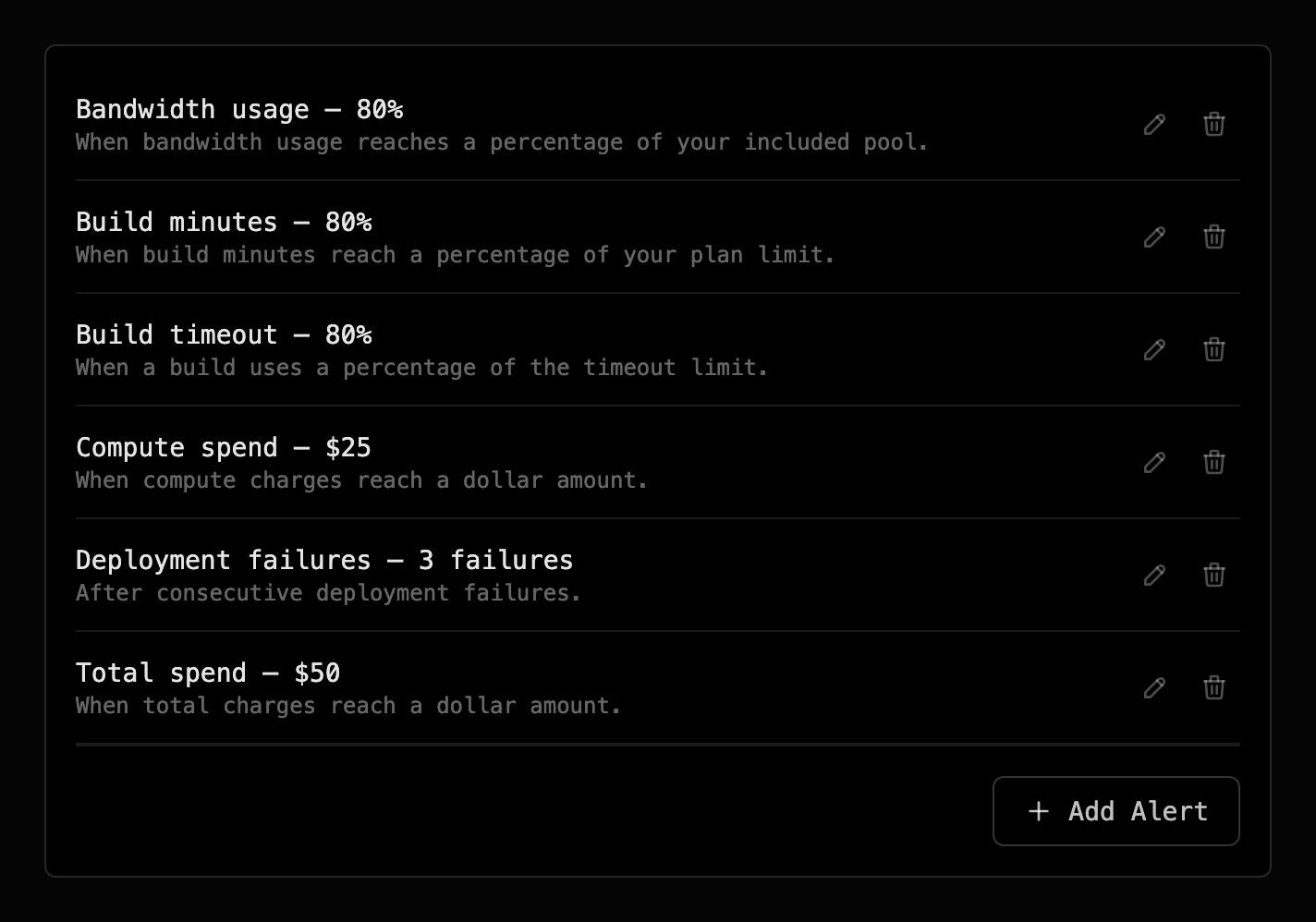
Set alerts so a threshold you're approaching reaches you before it surprises you on the invoice. Each alert watches one signal and notifies you when it crosses the percentage or count you set:
- Build minutes: how much of your monthly allotment you've used.
- Total spend and compute spend: your running charges for the cycle.
- Bandwidth usage: egress against your included pool.
- Deployment failures: consecutive failed deploys.
- Build timeout: how close a build is running to the maximum duration.
Standard sends alerts by email. Pro and Team can also send them to Slack, Discord, or Telegram. New accounts start with a sensible default set already configured. Add, edit, or remove alerts under Account → Billing.
Credits#
A credit is a balance Primcloud applies to your account: a goodwill adjustment, a correction for a billing issue, or a promotional grant. Credits show on your invoice as a line item and are applied against your balance automatically before your card is charged, so there's nothing to redeem. Credits are issued by Primcloud; they aren't something you buy or add yourself. If you think you're owed one, that's a support conversation.
Fair-use caps#
Every account has fair-use caps, anti-spam ceilings on things like applications per account, custom domains per app, secrets per environment, and replicas per formation. The caps are the same on every plan, and every legitimate customer runs comfortably inside them.
If you have a genuine reason to exceed one (an unusual number of preview environments, hundreds of small marketing sites, whatever your case is), send us a note and we'll lift the ceiling on your account. Caps are protective, not commercial. See Limits & Quotas for the current numbers.