Docs menu
Formations
A formation runs one process type from your Procfile, with the size and Instances count you choose.
On this page
A formation is one process type your app runs. Every line in your Procfile becomes its own formation, so you can size and scale your web process, workers, and anything else you declare separately. Each formation has a Formation Size, its compute, and an Instances count, how many copies of it run.
Where process types come from#
Process types come from a Procfile at the root of your repo, one per line as name: command. Every app needs a web process.
web: node server.js
worker: node ./workers/queue.js
consumer: node ./workers/consumer.js
No Procfile? Most languages start a web process on their own; your language's page under Language Support says what it runs.
After each successful build, your formations match the process types the build found: new names become new formations, existing ones keep their size and Instances, and names you removed have their formations shut down. web is never removed once it exists, since losing it would take your app offline.
A build that finds no process to run at all fails instead of removing every formation. Your formations stay as they were and you're notified that the build failed.
web and release#
Two process names are reserved.
web receives your app's HTTP traffic. It must listen on the port in $PORT, the only port that receives traffic; an app hard-coded to 3000 or 8080 won't get requests. A new copy of web gets traffic once it accepts connections on that port.
release runs once per deploy, before any traffic moves to the new version. Use it for database migrations or anything else that has to happen once before new code goes live. If it fails or runs past your plan's time limit, the deploy stops and your running app is unchanged; see Deployments. It isn't a formation: it has no size or Instances and doesn't appear in the Pod Formations panel.
Any other name (worker, consumer, bot) is a long-running background process that gets no HTTP traffic.
After your first deploy#
web starts with Instances at 1 so your app comes up right away. Every other formation starts at 0, so no worker runs until you turn it on. Every formation starts on Standard 1x, the smallest size. A size you pick before the first deploy finishes applies on your next deploy, and Instances can be changed once the first deploy has finished.
Scaling formations#
Change a formation's Formation Size and Instances in the Pod Formations panel on the application's overview.
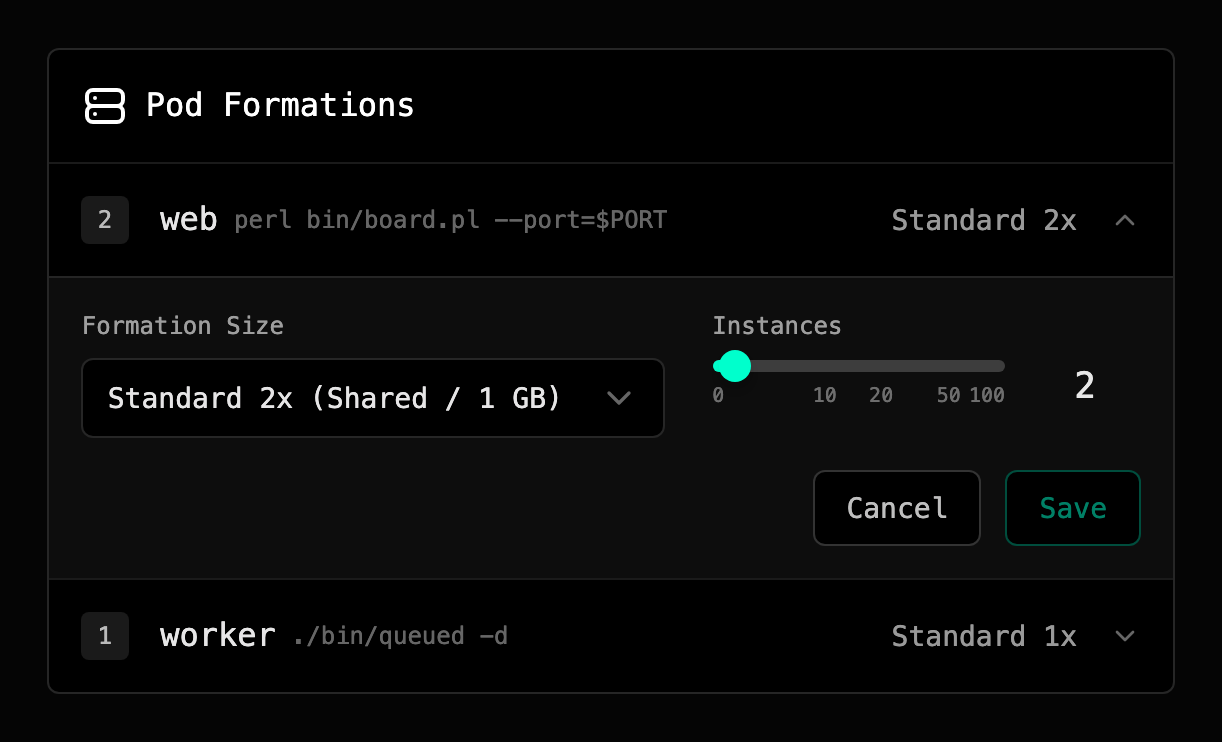
A new Instances count applies right away: raising it starts more copies of the formation, lowering it stops some, and the rest keep running untouched. A new size deploys your live build again at that size; see Compute.
Scaling down, including to zero, is always allowed. Scaling up needs your account in good standing; see Past-due & Suspension.
Formations that keep crashing#
Primcloud restarts a process that crashes. A formation that keeps crashing for about 30 minutes is scaled to 0 so it stops restarting, and you're notified by email and in the dashboard.
Find the cause in your logs, fix it, then scale the formation back up. A deploy keeps each formation's Instances, so a deploy alone leaves it at 0.
What a formation costs#
A formation costs its size's rate × its Instances × the time it runs. A web formation with Instances at 3 on Performance 2x costs 3 × $0.139/hr = $0.417/hr while it's up. A formation at 0 costs nothing.
Limits#
Each environment can have up to 20 formations, each with Instances up to 100. If you need more, contact support and we'll raise your account's limit.