Docs menu
Pod Formations
A pod formation runs one process type at a chosen replica count. Every Procfile process becomes its own formation.
On this page
A pod formation is one process type your app runs. Every line in your Procfile becomes its own formation with an independent replica count, so you can size and scale each process (web, workers, whatever you declare) separately.
Where process types come from#
Process types come from a Procfile at the root of your repo. The format is standard: one line per process type, name: command. Every app needs a web process.
web: node server.js
worker: node ./workers/queue.js
consumer: node ./workers/consumer.js
The Procfile is read during the build. When the build succeeds, Primcloud syncs your environment's formations to whatever process types the build reports: new names become new formations, existing names keep their current replica count and compute size, and names you removed from the Procfile have their formations shut down and archived. The web formation is the one exception: once it exists, it's never automatically deleted, because losing it silently would take the app offline.
A build that reports no runnable process at all is treated as a failure, not as a request to remove everything. The deploy stops, your formations are left exactly as they were, and you get a build-failed notification. Removing a single process from the Procfile still removes its formation as described above.
Special process types: web and release#
Two process names are reserved.
web receives HTTP traffic. Every environment with a web process gets an internal service pointed at its pods, and Primcloud routes traffic to them. Your web process must bind to the port in the $PORT environment variable. Primcloud only routes traffic to that port. If you hard-code 3000 or 8080, requests won't reach the pod.
release is a one-shot process that runs once per deploy, before any long-running formation is updated. Use it for database migrations, cache warm-ups, asset uploads, or anything else that needs to happen exactly once before the new code takes traffic. If the release process exits with a non-zero code, or is still running after its time limit (20 minutes on Standard, 45 on Pro, 60 on Team), the deploy fails: no formation is rolled, no new pods start, and the previous release keeps running. The release process isn't a scalable formation; you can't set its replica count or resize it after the fact, and it doesn't appear in the formations panel.
Any other process name (worker, consumer, bot, whatever you like) is a plain background worker. Primcloud runs it, but doesn't route traffic to it or watch its port. It's just a long-running process.
Default formations at first deploy#
The first successful build seeds your environment's formations from the Procfile. web starts at 1 replica so your app comes up live immediately; every other process type starts at 0 replicas so you can enable them explicitly rather than being surprised by workers you forgot to size. Every new formation gets the smallest compute size by default (Standard 1x), and a size you pick from the formations panel before the first deploy has rolled out applies on your next deploy. Replica counts can be changed once the first deploy has finished rolling out; until then the panel shows no instances control.
Scaling formations#
Change replica count and compute size from the formations panel on the application dashboard. The replica count is available once the environment's first deploy has rolled out.
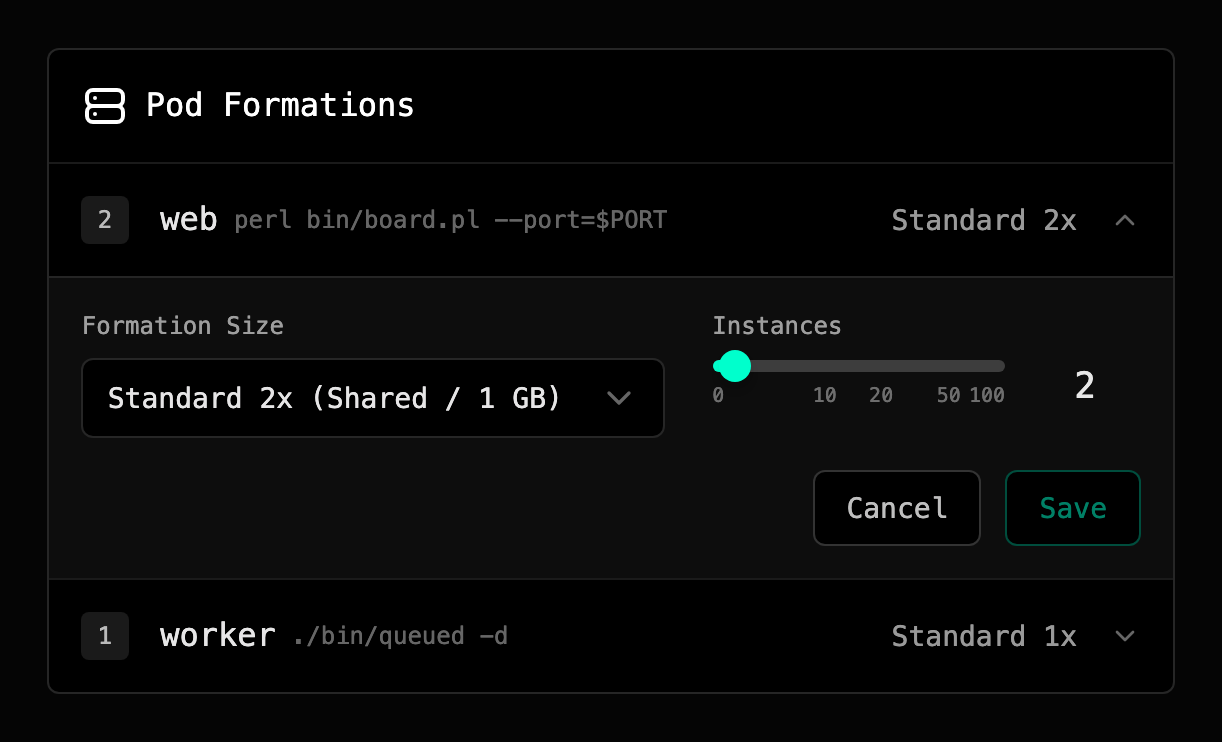
Scale down (fewer replicas, smaller compute, or shutting a formation to zero) is always allowed, regardless of billing state, so you should be able to stop bleeding money at any moment. Scale up (more replicas or larger compute) requires your account to be in Active billing state; if you're past-due or suspended, the change is blocked until the outstanding invoice clears.
Timing on formation changes#
Replica changes roll out immediately. Primcloud patches the formation, brings new pods up one at a time, and terminates old ones only after the new ones report ready, so no traffic gets dropped during the swap.
Once the first deploy has rolled out, compute-size changes go through the release pipeline: Primcloud creates a new release reusing the last successful commit and rolls pods with the new size, again one at a time. The new release appears in your deployment history so the change is auditable. See Compute for the size lineup and pricing.
Formation × compute = cost#
Each formation's bill is straightforward: compute price × replica count × hours running. A web formation with 3 replicas on Performance 2x runs at 3 × $0.139/hr = $0.417/hr while it's up. A worker formation scaled to zero costs nothing. The release process only bills for the actual seconds it runs: a fast migration is essentially free; a slow one bills a few cents.
Limits#
The default ceilings, set high enough that any real app is effectively unlimited, are:
- 20 formations per environment. Enough for web + a fleet of workers, schedulers, and bespoke queue consumers.
- 100 replicas per formation.
If you have a legitimate reason to exceed either, send us a note and we'll lift your account's cap.